 Digital Peax
 GA4 in 2026: the tracking setup we actually trust
 By
By 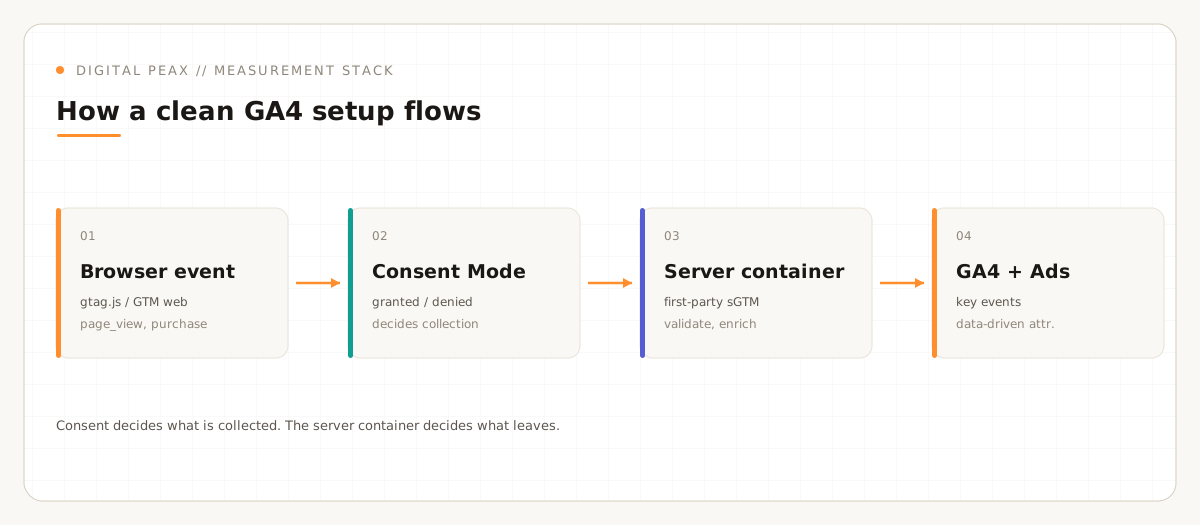
If you rebuilt your site this year and bolted GA4 on at the end, there is a good chance your numbers are quietly wrong. Not broken in an obvious way, just wrong enough to send budget to the wrong places. The GA4 setup we run on client accounts follows, along with the reasoning behind each decision.
GA4 is not Universal Analytics with a new coat of paint. The data model is different, the conversion logic moved, and the privacy layer in front of it now decides how much data you collect in the first place. Get those three things right and the reports start telling the truth.
Everything is an event, and the important ones are key events
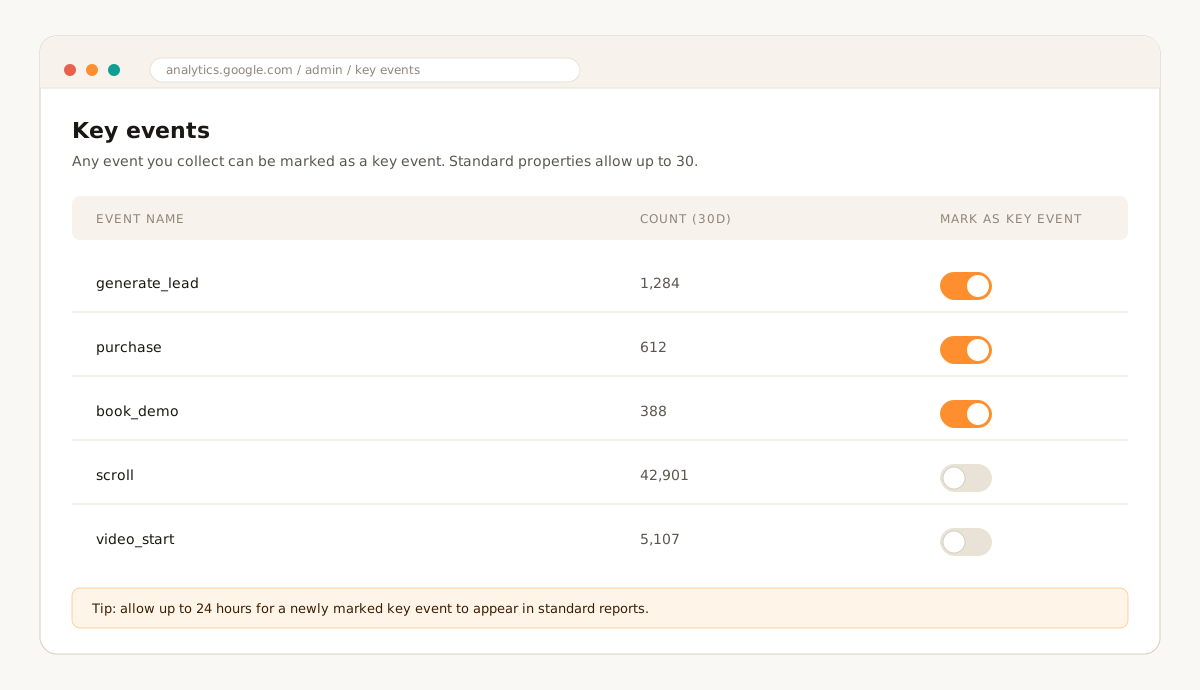
In GA4 every interaction is an event. There are no more goals. When an event matters to the business, you mark it as a key event, and that is what shows up as a success metric in your reports. Any event you already collect can become a key event, so the work is less about new tracking and more about deciding what actually counts.
Two limits are worth knowing before you tag everything in sight. A standard property allows up to 30 key events, and a newly marked key event can take up to 24 hours to appear in standard reports, so do not panic if it is missing the same afternoon. Google documents both in its help page on marking key events.
Key events are not conversions anymore
This rename trips people up. In current GA4, a key event is the important action measured in Analytics. A conversion is now an Ads concept: you import a key event into Google Ads and it becomes a conversion used to optimize bidding. Same underlying action, two homes, two names. Google explains the split in conversions vs. key events. The practical upshot: do your counting in GA4, do your bidding in Ads, and do not expect the two numbers to match to the unit.
Attribution is data-driven by default now
If you still think in last-click, GA4 has already moved on. Back in 2023 Google retired the first-click, linear, position-based and time-decay models, and made data-driven attribution the default across GA4 and Google Ads. You can see the current options in attribution settings. Data-driven attribution is not magic, but it is a better starting point than handing all of the credit to the last click before purchase.
Our advice: leave attribution on data-driven, then sanity-check it against a holdout or a simple incrementality test before you trust it for big budget calls. The model is only as good as the conversions feeding it, which is why clean key events come first.
Consent Mode decides what you even keep
In the EU especially, the cookie banner is not a legal checkbox bolted on top of analytics. It is part of the measurement pipeline. Consent Mode tells Google tags whether they may use cookies, and there are two ways to wire it up.
- Basic: tags are blocked entirely until a user consents. Clean, but you lose all signal from people who decline, and modeling falls back to a general model.
- Advanced: tags load on every page and send cookieless pings while consent is denied, then send full data once it is granted. This is what unlocks Google’s behavioral modeling, which estimates the behavior of users who declined based on similar users who accepted.
Behavioral modeling is not automatic. Google lists thresholds in its behavioral modeling documentation: among them, at least 1,000 events per day with analytics_storage set to denied over a seven day window, and at least 1,000 daily users granting consent. Below that volume there is nothing to model from, so smaller sites should set expectations accordingly.
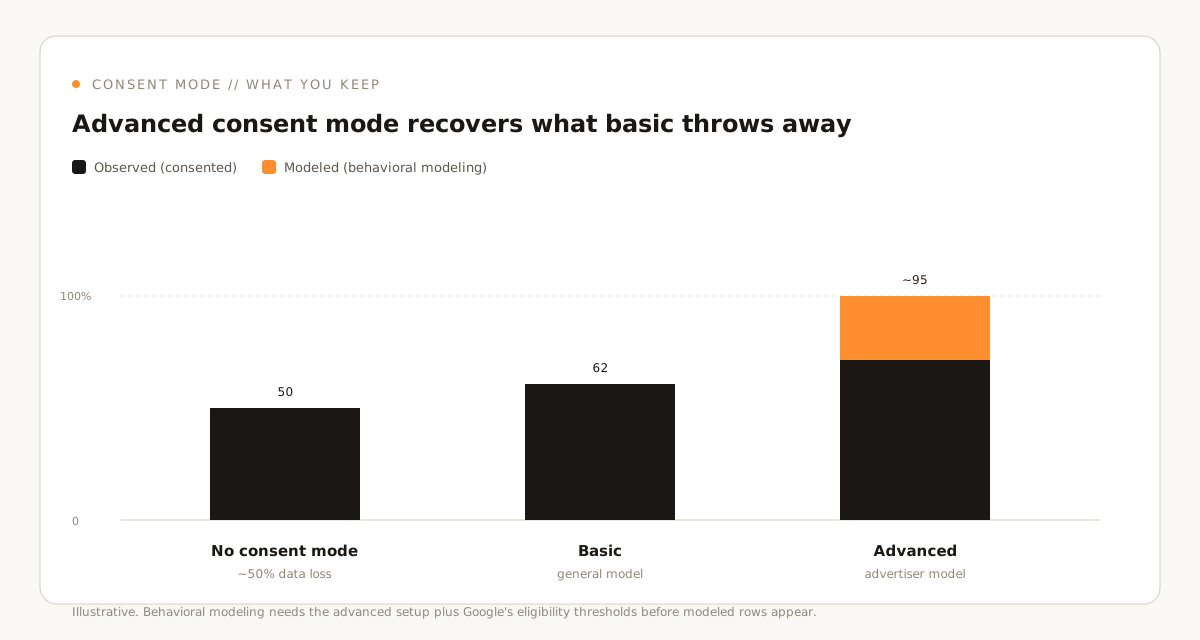
Fix them in this order: consent decides what you collect, attribution decides who gets the credit, and key events decide what counts.
Server-side tagging, when it earns its keep
Server-side tagging gets sold as a fix for everything. It is not, but it does two real jobs well. Running tags in a first-party server container means you control the HTTP requests before they reach any vendor: you can validate, anonymize or block them, and you can enrich events with data you would never expose in the browser, such as a hashed email or an order margin. Google’s own server-side tagging fundamentals are refreshingly honest about both the benefits and the operating cost.
The catch is that someone has to run and pay for that container, and a sloppy server-side setup can hide problems instead of fixing them. We reach for it when first-party data quality and durable cookies genuinely matter, not as a default.
Three 2025 and 2026 features worth turning on
- Annotations. Google brought annotations back in 2025, so you can finally pin a note to the exact day you changed a campaign or shipped a redesign. It sounds small. It saves hours of "what happened here" later. See about annotations.
- Generated insights. GA4 now surfaces plain-language explanations of what changed in your data inside reports. Treat them as a starting question, not a verdict.
- Predictive audiences. Build audiences from likely future actions, such as probable purchasers or likely churns, rather than only past behavior.
How we sequence a clean setup
If you are starting over, this is the order that avoids rework:
- Wire Consent Mode first, in advanced mode, before any other tag fires.
- Define the five to ten events that map to revenue or pipeline, then mark the right ones as key events.
- Leave attribution on data-driven and validate it against a holdout.
- Add server-side tagging only when first-party quality justifies the overhead.
- Annotate every meaningful change from day one.
None of this is exotic. It is just GA4 used the way it was actually designed, rather than as a Universal Analytics tribute act. Do it once, properly, and you stop arguing about whether the numbers are real and start using them. It is also the exact sequence our analytics services run on every new client account.
Sources
- Google Analytics Help: Mark events as key events
- Google Analytics Help: Conversions vs. key events
- Google Analytics Help: Select attribution settings
- Google Analytics Help: Behavioral modeling for consent mode
- Google for Developers: Why and when to use server-side tagging
- Google Analytics Help: About annotations
The Peax Brief
One sharp idea on data-driven growth, every other week. No spam, unsubscribe anytime.